All your League accounts, one click apart.
LeagueVault puts every account you own in one window: rank, LP, decay timers, recent games. Pick one, press Login, and the Riot Client opens already signed in.
Free. Windows 10 and 11. Version 1.2.0, see what's new.
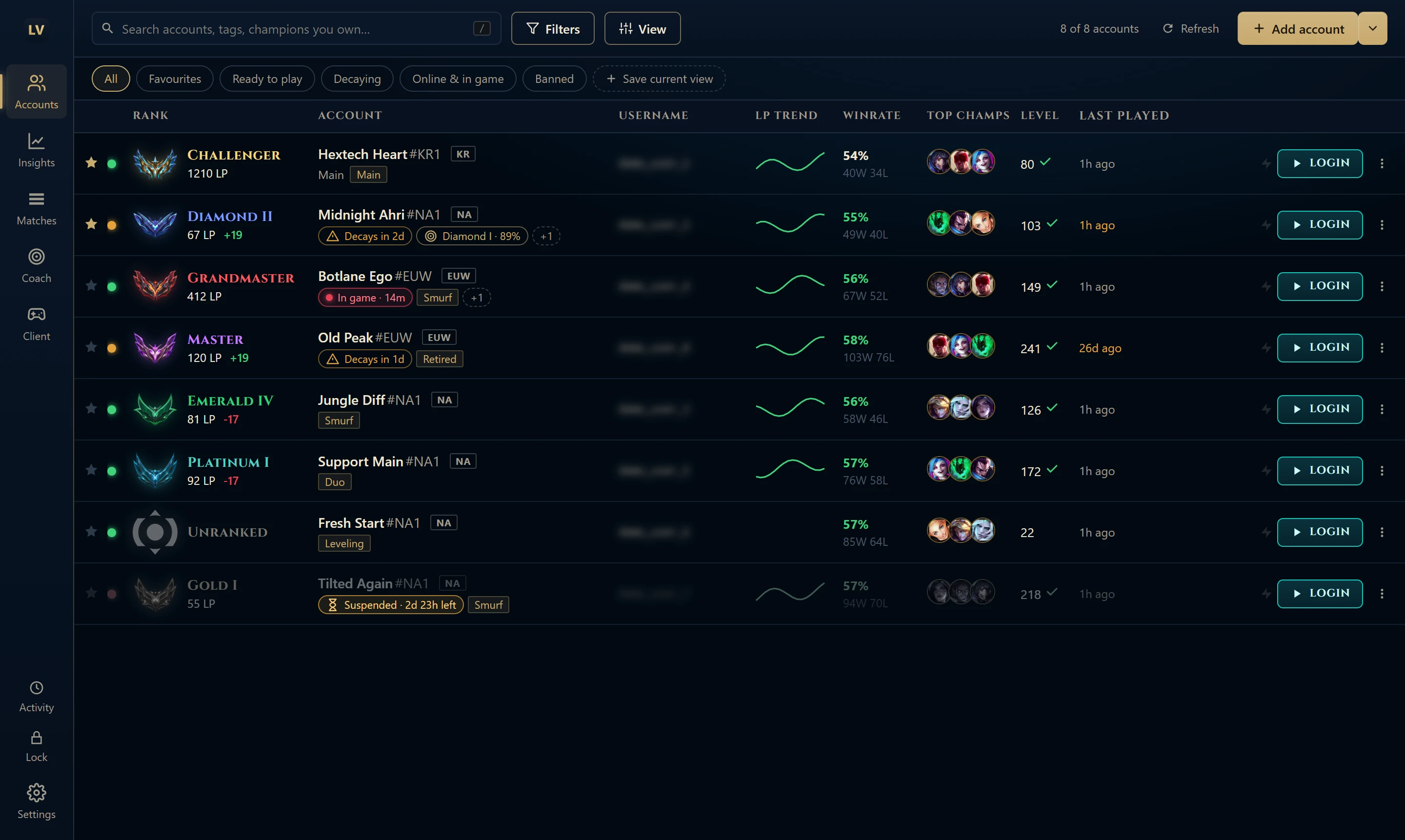
The whole app, page by page
These are real screenshots of the app running in demo mode. Choose a page from the sidebar, the same way you would in LeagueVault.
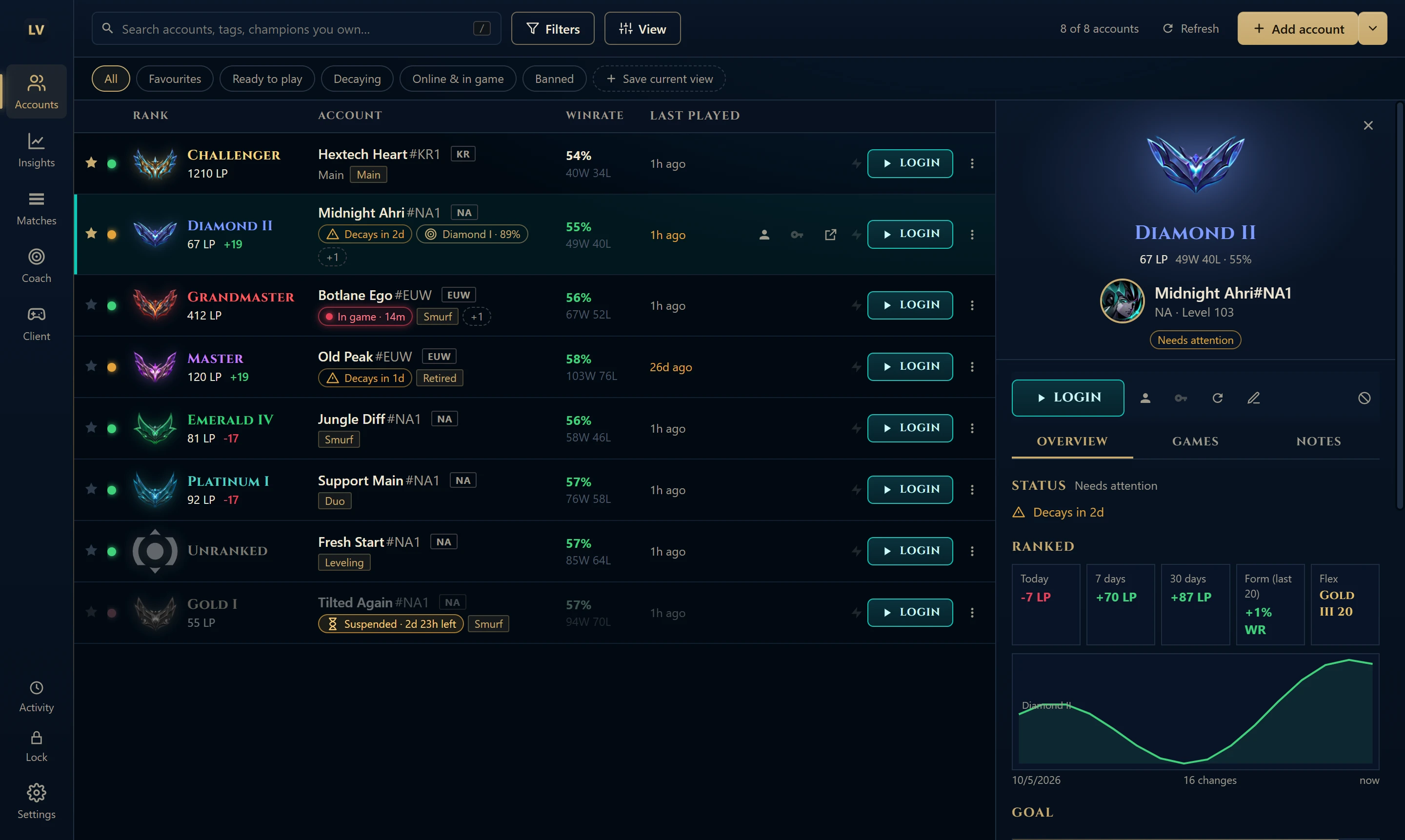
Account panel
Select an account to see its rank, LP gained today, this week and this month, LP history, goal progress, mastery and last games. Log in, copy the password or refresh from the same panel.
Sign in once. After that, just press Login.
LeagueVault never types your password into Riot's sign-in. You sign in yourself the first time, and it saves that session so every later switch is instant.
-
Add your accounts
Enter each Riot ID, region and login. Passwords are encrypted on your PC with Windows' own encryption.
-
Sign in to each one once
Choose Set up sessions and LeagueVault opens the Riot Client for each account in turn. Sign in with “Stay signed in” ticked and it moves on to the next.
-
Switch with one click
Press Login, or Ctrl+Shift+L from anywhere, and the saved session is restored. Close League before switching.
Also in the app
- Champion select assistant
- An overlay with your best rune pages, summoner spells and record against each enemy pick.
- Live game scouting
- Ranks, winrates and mastery for all ten players when one of your accounts is in game.
- Decay and ban tracking
- Exact decay days from the League client, and countdowns for suspended accounts.
- Rank goals
- Set a target rank per account and watch the progress bar fill.
- Search what you own
- Type a champion or skin name to find the accounts that have it.
- Lock and themes
- An optional lock password, and Hextech, Midnight and Light themes.
Your vault stays on your PC
- Encrypted locally. Passwords, saved sessions and your API key are encrypted with Windows and can't be opened on another computer.
- Nothing uploaded. No accounts, no ads, no analytics. Rank and match requests go to Riot, directly or through the invite-code relay.
- Secrets left out of reports. Error logs and diagnostics have passwords and session tokens removed before you share them.
Questions
Something else? Open an issue on GitHub.
Is LeagueVault free?
Yes. It's a free project with no ads or analytics.
Do I need a Riot API key?
Ranks and match history need Riot API access. Paste your own key from Riot's developer portal into Settings, or use an invite code if you were given one. Development keys expire every 24 hours.
Why does Windows show a warning when I install it?
The installer isn't code-signed yet, so SmartScreen says the publisher is unknown. Check that the file came from the official releases page, then choose More info and Run anyway.
Does LeagueVault sign in for me?
No. You sign in yourself the first time in the Riot Client, with “Stay signed in” ticked. LeagueVault saves that session and restores it on later switches. If a session expires, sign in again and it's saved again.
How do I update?
The app updates itself when a new version is published. To install by hand, run the new installer over your current version. Your accounts and settings are kept.
How do I report a problem?
In the app, go to Settings, then Help, then Report a problem. It collects the error log and client diagnostics with secrets removed. Attach them to a GitHub issue.

Open your vault
Free for Windows 10 and 11. Once installed, it keeps itself up to date.
Download LeagueVaultVersion 1.2.0. All versions and release notes